
Problems and fixes
Why is my business not showing on Google Maps? A 7-point check for South African businesses
Why is my business not showing on Google Maps? Find out if it's a profile problem or a ranking one, then work through Google's own fixes in order.
Published
Why is my business not showing on Google Maps? There are two very different answers, and the fix depends on which one you have. Either your profile doesn't show at all, even when someone types your exact name, or it shows for your name but not when people search for what you do.
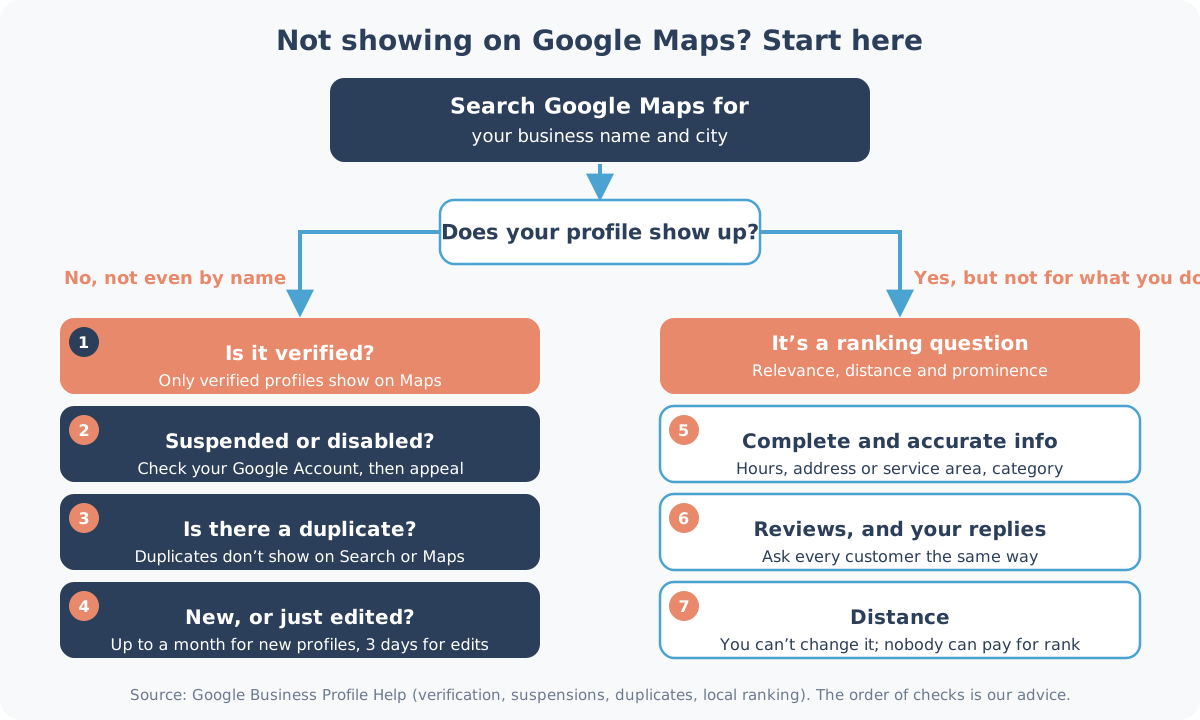
The first is a profile problem with a cause you can track down. The second is about ranking, which you work on over time. One search tells you which you're dealing with.
Start with one search
Open Google Maps and search for your business name and city, the way Google's own help page suggests. Then pick your path:
- Nothing comes up, even by name: work through checks 1 to 4 below.
- You show up by name, but not for "plumber Umhlanga" or "dentist near me": skip to checks 5 to 7.
1. Is your profile verified?
Google's help page on finding your business is direct about this: "Only verified businesses can show their business info on Maps and Search." If you added your business and never finished verification, that's the first thing to fix.
Open your Business Profile and look for Get verified. According to Google's verification page, the methods on offer "are automatically determined by Google and can't be changed", and they can include phone or text, email, a live video call or a postcard. Verification reviews "take up to 5 business days", and sometimes longer.
If you're waiting for a postcard, leave your profile alone. Google warns: "Do not edit your business name, address, or category on your Business Profile. If you do, the code we sent you won't work."
2. Is it suspended or disabled?
If your profile breaks Google's rules, Google's help page says it "becomes disabled or suspended and won't show to other users on Google until you resolve the issue." You'll get a notification in the Google Account you use to manage the profile, so check that inbox first, including the one a former staff member may have set up.
Google's page on suspended or disabled profiles explains the appeal:
- Read the guidelines for representing your business and fix whatever broke them. One example: extra words in your business name. Google says unnecessary information in the name "could result in the suspension of your Business Profile."
- Open the appeals tool and select the decision you want to appeal.
- Add evidence. Google lists official business registration, a business licence, tax certificates and business utility bills, and says the name and address on them should match the profile.
Two warnings from the same appeals page: don't set up a second profile for the same business, and "Appeals can only be submitted once." So get the evidence together before you press submit.
3. Is there a duplicate?
Google allows one profile per business. Its duplicates page says: "If a profile is considered a duplicate, it won't show on Google Search or Maps." Its reasons include a verified profile that already exists for the same business, several profiles at the same address, and separate profiles for different services.
We've seen this on real listings. When we checked 20 dental listings in Sea Point one by one, at least 3 practices appeared under more than one listing (our Sea Point snapshot).
If someone else already owns a verified profile for your business, request access. Google gives the current owner 3 days to respond. If they don't, you may get the option to claim it, though Google says that option "isn't always available."
4. Is it new, or did you just change something?
Patience is sometimes the fix. Google's help page says "Rankings for new businesses can take up to a month to appear in search results", and that when you edit your business info, "changes can take up to 3 days to appear."
While you wait, check that nobody else has changed your details. Google can apply edits suggested by the public, and you now get 4 days to accept or reject the ones it sends you (how suggested edits work). So check that your address and map pin are still right.
5. You show by name, but not for what you do
This is a ranking question, not a fault. Google's page on improving your local ranking says: "Local results are mainly based on relevance, distance, and popularity." It explains them as relevance, distance and prominence, and it's clear that "There's no way to request or pay for a better local ranking on Google."
Start with relevance. Google says "Businesses with complete and accurate info are more likely to show up in local search results", and "If your business info isn't accurate, your Business Profile might not show up for relevant searches in your area." Fill in your hours, your address or service area, and your category.
On categories, Google's guidelines say to "Choose the fewest number of categories it takes to describe your overall core business." So pick the category that best describes your core business, not every loosely related one.
If you work at customers' homes or sites, set yourself up as a service-area business. The same guidelines say: "If you're a service-area business, you should hide your business address from customers."
6. Reviews, and your replies
Prominence is partly reviews. Google's local ranking page says this factor is based on things like "how many websites link to your business and how many reviews you have", and that "More reviews and positive ratings can help your business's local ranking." It also says replying "shows that you value their feedback."
Ask every customer the same way, never offer anything in return, and reply to your reviews, good or bad. Our guide to getting Google reviews covers how to ask without breaking Google's rules or POPIA. A counter review stand by the till helps too: customers open your review page with a tap of the phone.
7. Distance: the one you can't change
Google describes distance as "how far each business is from the customer who's searching." A café in Sea Point is further from someone searching in Bloubergstrand than from someone two streets away, and no setting changes that. Work on relevance and prominence, and make sure your address or service area is accurate.
Quick checklist
| What you see | Likely cause | What to do |
|---|---|---|
| Not on Maps even by name, never verified | Not verified | Finish verification under Get verified |
| Was there, now gone | Suspended, disabled or marked as a duplicate | Check your Google Account notifications, fix the issue, then appeal once with evidence |
| Someone else manages it | Another owner | Request access; they have 3 days to respond |
| Just created or edited | Processing time | Up to a month for new businesses, up to 3 days for edits |
| Shows by name only | Ranking | Complete info, the right category, reviews and replies |
Want a second pair of eyes?
Our Google Business Profile audit starts with a Snapshot Audit (R1,990), which gives you five clear written gaps on your live profile within five business days, or you don't pay, so it's a quick way to see which of these checks applies to you. See what each option costs, or how we look after Google Business Profiles in Durban and Cape Town.
Want us to check yours? WhatsApp Shaun on 075 330 9812 with a link to your Google listing, or your business name and city.