
Hours and holidays
Festive season trading hours: a December checklist for your Google profile
Festive season trading hours for December 2026: the dates to set on your Google Business Profile, when to use temporarily closed, and a short checklist.
Published
Your festive season trading hours should be on Google before people start looking for them, and for most businesses that means doing it this month. Add every December and January date that's different from a normal week under special hours on your Google Business Profile, then put the same hours on WhatsApp, your website and the door.
Do all the dates in one sitting. It's the dates you leave for later that get missed. This post is the December list. For every public holiday to the end of 2027, see our full guide to Google holiday hours.
Why December hours matter more than usual
In December a lot of the people searching for you have never been inside. Cape Town International had a record December in 2025, with 1.12 million two-way passengers, just under 364,000 of them international, according to Wesgro. Those are Cape Town figures only.
Visitors don't know your usual hours. They trust what Google shows them. On the holidays on Google's holiday list, Google says a warning may appear on your profile telling people your hours might differ. Setting special hours in advance is how you replace that with the real answer.
The December and January dates that catch people out
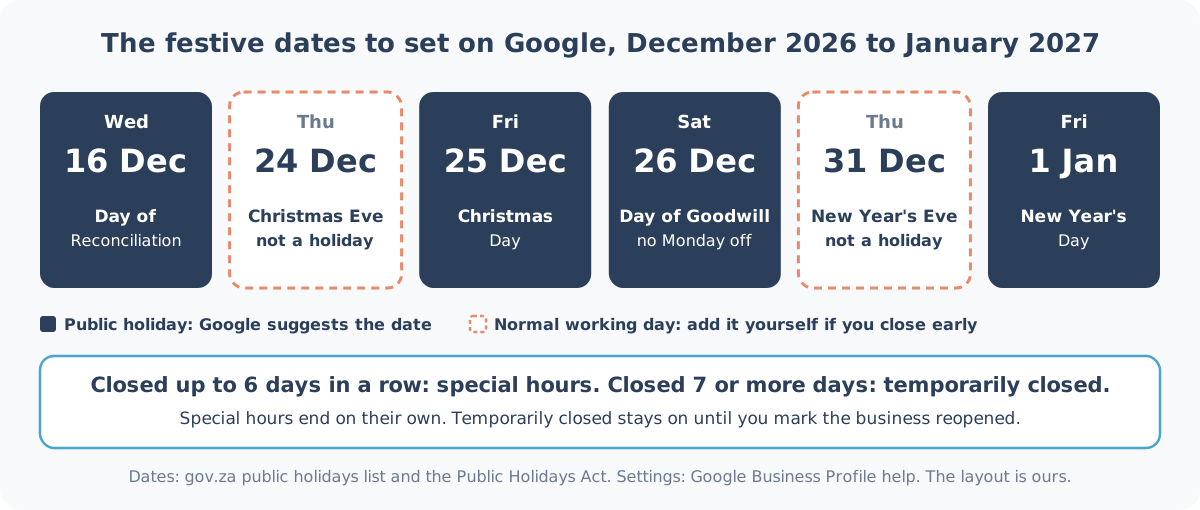
| Date | Day | What it is |
|---|---|---|
| 16 Dec 2026 | Wednesday | Day of Reconciliation, a public holiday |
| 24 Dec 2026 | Thursday | Christmas Eve. Not a public holiday |
| 25 Dec 2026 | Friday | Christmas Day, a public holiday |
| 26 Dec 2026 | Saturday | Day of Goodwill, a public holiday |
| 31 Dec 2026 | Thursday | New Year's Eve. Not a public holiday |
| 1 Jan 2027 | Friday | New Year's Day, a public holiday |
Three things trip people up here.
Christmas Eve and New Year's Eve aren't on gov.za's public holidays list, so they're normal working days. Many salons, cafés and practices still close early on one or both. If you do, add them yourself, because Google won't suggest them.
Day of Goodwill falls on a Saturday this year. Under the Public Holidays Act, only a holiday that lands on a Sunday moves to the Monday, so Monday 28 December is a normal working day. If your team takes it off anyway, that's a special hours date too.
Google calls 26 December "Boxing Day" on its list. Same day, different name.
And before December: Election Day is this Wednesday, 4 November. If it isn't on your profile yet, here's what to set for 4 November.
Special hours or "temporarily closed"?
It comes down to how long you're closed.
For a single day, a long weekend or an early close, use special hours. Google's special hours guide says they cover closures of up to 6 days in a row, and they only show on the dates you set. On 2 January your normal hours are back without you touching anything.
If you shut for 7 or more days in a row, the same guide says to mark the business temporarily closed instead. Say a Durban North building contractor closes from 18 December to 11 January. Two things to know before you do it. Google's temporarily closed page says that for broad searches, temporarily closed businesses can rank after open ones. And it stays on until you mark the business as reopened, so put a reminder in your phone for your first day back.
If you're trading longer than usual for the season, say a Sea Point gelato shop staying open until 22:00 through the holidays, add those days as special hours with the later closing time. It saves you remembering to change your regular hours back in January.
How to add the dates on Google
These steps are from Google's special hours guide:
- Go to your Business Profile.
- Select Edit profile, then Hours.
- Next to Special hours, select Edit.
- For a date Google suggests (16, 25 and 26 December and 1 January), select Review. For anything else, such as 24 or 31 December, select Add a date.
- Tick Closed, or untick it and enter the hours you'll actually trade.
- Select Save.
Special hours only show if your business hours are set to "Open with main hours". And if a holiday doesn't change anything for you, Google still suggests you confirm it: "It's a good idea to confirm your hours for official holidays, even if they're the same as your regular hours."
Change WhatsApp, your website and the door the same day
Google is only one of the places people check. If WhatsApp says one thing and the door says another, customers can't tell which is right.
- WhatsApp Business: set an away message with a schedule that covers the days you're closed, and post a status a few days before.
- Your website: a one-line banner with the dates and the day you're back.
- The door: a printed sign, up a week or so before the first closed day.
- Your Google profile: Google lets you post updates that show to customers on Search and Maps, so add one with your festive hours in early December.
Our no-cost holiday hours planner writes most of this for you. Enter your hours once and it gives you the WhatsApp away message and status, website banner text and a printable A4 door sign, plus a temporary closure mode for a longer shutdown. If your sign or banner sends people to WhatsApp, make a chat link and QR code with the WhatsApp link maker.
December is also when you see the most customers, so it's a good month to make your review page easy to reach. A wall or door review plate sits where people pass on the way out, and customers open your Google review page with a tap of the phone. The rest of our review stands and cards are in the shop.
The checklist
| When | What to do |
|---|---|
| This week | Decide your hours for 16, 24, 25, 26 and 31 December, 1 January and any shutdown |
| The same day | Add each date under special hours on Google, or note the dates you'll mark temporarily closed |
| The same day | Update your WhatsApp away message, website banner and door sign |
| Early December | Post a Google update with your festive hours, and open Special hours to check every date is there |
| Your first day back | Mark the business reopened if you used temporarily closed, and check your normal hours show |
Want someone to keep an eye on it?
Every Heights Care plan includes keeping your Google holiday and special hours up to date, from R1,490 a month, month-to-month. Here's how we look after holiday and special hours, and what each plan costs.
Want us to check your festive hours? WhatsApp Shaun on 075 330 9812 with a link to your Google listing.