
Google reviews
Google Business Profile for dentists: we checked 20 Sea Point listings
Google Business Profile for dentists: we checked 20 Sea Point listings one by one in Cape Town. The gaps we found, why they matter, and how to fix them.
Published
When we checked in early October 2026, 16 of the 17 dental listings in Sea Point with Google reviews showed no owner reply on any of their newest three. That's the biggest gap we found when we looked at the Google Business Profile for dentists in one Cape Town suburb, one listing at a time.
We didn't look at anyone's dentistry. This is only about profile upkeep: replies, recent reviews, hours, website links and duplicate listings. Each one is a small job. Below are the numbers, what Google says about each gap, and what to do about it. The same checks work for any local business in Cape Town, not only dental practices.
What we found
| Gap | Listings |
|---|---|
| No owner reply on any of the newest 3 reviews | 16 of 17 with reviews |
| No new review in the past 12 months | at least 8 of 20 |
| No website link | 8 of 20 |
| No opening hours shown | 4 of 20 |
| No reviews at all | 3 of 20 |
| Practices that appear under more than one listing | at least 3 |
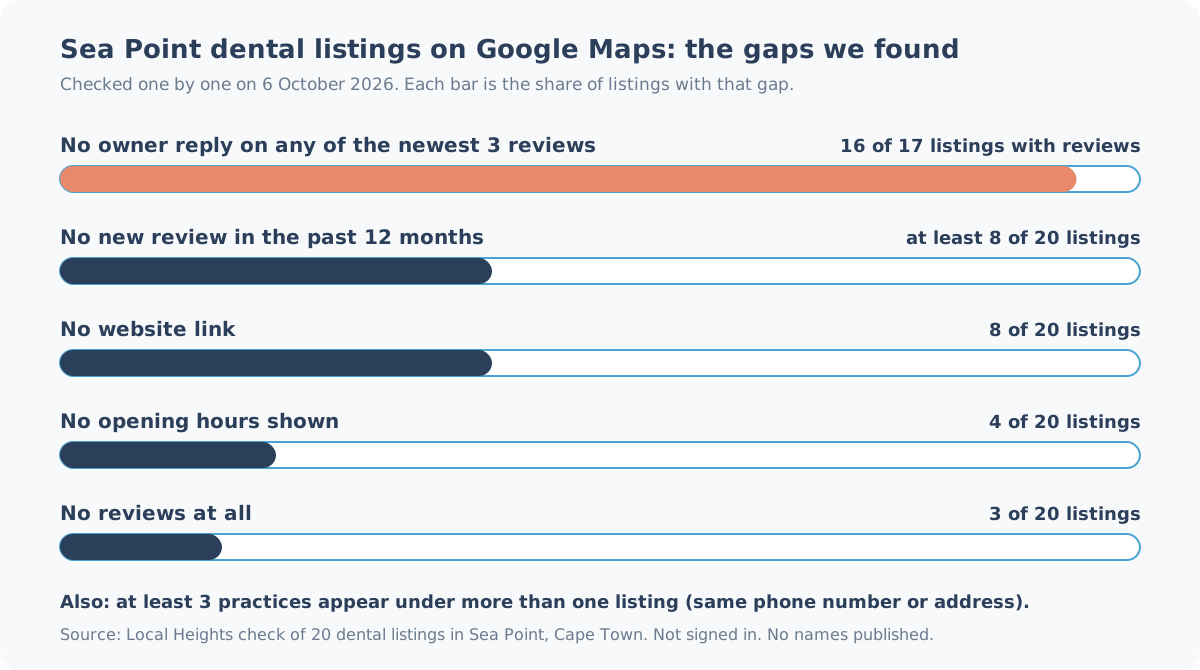
Only one listing replied to its recent reviews. Several listings' newest review is 6 to 8 years old. Most of them are quick to fix.
How we checked
- When: Tuesday 6 October 2026, each listing opened and checked one by one. These counts are true for that day only.
- Search: dentist Sea Point Cape Town on Google Maps. We scrolled to the end of the results and opened every dental listing with a Sea Point (8005) address.
- What counted as a listing: each separate place on Google Maps offering dental care, whatever category it uses on Google (not only "Dentist"). A practice and a dentist who works there can each have their own listing, so 20 listings doesn't mean 20 practices. We left out one sponsored result outside Sea Point, a sleep clinic and one entry that appeared twice in the results.
- Replies: we sorted reviews by newest and looked at the newest 3 (or fewer, where a listing had only 1 or 2 reviews).
- Recent reviews: "at least 8" includes the 3 listings with no reviews at all. Two more listings showed their newest review only as "a year ago", so we couldn't tell which side of 12 months it fell and didn't count them. Counted as older, the total would be 10.
- Limits: this is one suburb on one day, not a sample of Cape Town. We weren't signed in to Google, so we couldn't see photo counts and we make no claims about photos. We didn't contact any practice, and we won't publish names.
Gap 1: reviews with no reply (16 of 17)
A patient comparing two dentists sees the reviews and, under some of them, a reply from the practice. When none of the reviews have a reply, it can look as if nobody is reading.
Google's own advice is plain. On its page about improving your local ranking, under "Respond to reviews", Google says: "When you reply to customer reviews, it shows that you value their feedback." Its tips for review replies add: "Keep it short and simple" and "Respond in a timely manner".
What to do
- Reply to new reviews as they come in, starting with the newest. In our view, answering this month's reviews matters more than clearing a backlog of old ones.
- Keep each reply short and specific. Google suggests not sending the same "thank you" to everyone, so mention something from the review.
- For a complaint, stay calm, don't argue in public, and offer a phone number or email to sort it out privately. Google's tips say the same: "politely request that the reviewer contact you via phone or email to resolve the issue privately."
A rule for health practices. Dentists have a duty of confidentiality that most businesses don't. A summary of HPCSA Booklets 5 and 16 in medico-legal insurer EthiQal's August 2026 webinar notes tells practitioners not to reveal confidential information when they respond to online reviews. The same notes say that a patient describing their treatment in a review doesn't automatically give you permission to disclose clinical information in reply. In our reading, that means replies that don't confirm the person is a patient, don't mention treatment, and move anything specific to a private call. If you're unsure, ask your professional body or your indemnity insurer before you reply.
Gap 2: no new review in 12 months (at least 8 of 20)
At least 8 of the 20 listings had no review from the past year. That includes the 3 with no reviews at all. On several, the newest review was 6 to 8 years old.
A new patient reading an 8-year-old review can't easily tell whether the practice, the staff or even the phone number is the same. Google also lists reviews under "prominence" on the same local ranking page: "More reviews and positive ratings can help your business's local ranking." That's Google's general statement, not a promise for any one listing.
What to do
- Any business: ask every customer the same way, for example with Google's own review link or QR code, which its review tips page explains how to share. Google is strict that you can't offer anything in return: incentives for reviews are "strictly prohibited".
- Dental and other health practices: check what the HPCSA's ethical rules allow before you ask patients for reviews. We're not giving legal advice here, and health professionals have rules on patient information that a café or a salon doesn't.
Gap 3: no opening hours (4 of 20)
Four listings showed no opening hours. A patient with toothache looking at a listing with no hours has to phone to find out if anyone's there, and some won't bother.
Google's local ranking page lists "Your business hours, including special store hours" among the details to fill in, and says complete information "helps customers know what you do, where you are, and when they can visit."
There's one exception. Google's guidelines for representing your business say that businesses "that operate only by appointment" shouldn't provide hours. Some of the four may have left hours off on purpose. If your phones and front desk keep set hours, though, those are the hours patients need.
What to do
- Follow Google's steps to edit your business hours: your Business Profile, Edit profile, then Hours.
- Add special hours for public holidays. Our guide to Google holiday hours in South Africa lists every date to the end of 2027, and our no-cost holiday hours planner turns them into a checklist you can work through.
- Keep an eye on changes you didn't make. Anyone can suggest new hours for a listing, and Google may publish them if you don't respond within 4 days. Our post on suggested edits and the 4-day window explains how that works.
Gap 4: no website link (8 of 20)
Eight listings had no website link. Some of these practices may not have a website. Others may have one that just isn't linked.
Google's page on editing your Business Profile says: "You can share your business's website with your customers on your Business Profile." Enter the full address, including "https://". A website also matters when someone suggests a change to your listing: Google's page on updates to your Business Profile says it may publish an unanswered edit if it's supported by "other publicly available information, such as your business website".
What to do
- If you have a website, add it in Edit profile and check that the link opens the right page.
- Make sure the site shows the same phone number, address and hours as your Google listing.
- If you don't have a website, fill in everything else on the profile carefully. Without a website, your profile is all a patient has to go on.
Gap 5: one practice, several listings (at least 3)
In at least 3 cases, more than one listing shared a phone number or an address. Some setups like this are allowed. Others aren't.
Google's guidelines name dentists as individual practitioners. A public-facing dentist can have their own listing, and where several practitioners work at one location, "The organization should create a Business Profile for this location, separate from that of the practitioner." Support staff "should not create their own Business Profiles", and a practitioner "shouldn't have multiple Business Profiles to cover all of their specializations."
A true duplicate is different. Google's page on duplicate profiles says: "You can have only one Business Profile for each business. Multiple profiles for the same business may mislead your customers and are against our policies." It adds that a profile considered a duplicate "won't show on Google Search or Maps".
From the outside, we can't always tell which kind we're looking at. You can.
What to do
- Search Google Maps for your practice's phone number and address, and list every listing that comes up.
- Keep one listing for the practice, plus, if you want them, one for each dentist who sees patients. Old listings for staff who've left, or a second copy of the practice, are the ones to sort out.
- To merge two listings for the same business, Google's duplicates page says to report a suggestion on Google Maps. It also warns that "replies to reviews may be lost" in a merge, so save any replies you want to keep first.
Check your own listing in five steps
- Open your listing on Google Maps while signed out, the way a patient sees it.
- Sort the reviews by newest. Reply to any without a reply, within the confidentiality rules above.
- Check that your hours, including the next public holiday, match what your front desk actually does.
- Tap the website link. Check that it opens and that the phone number on the site matches.
- Search your phone number on Maps and note every listing that shows up.
If all five look right, you're ahead of most of the listings we checked.
Want a second pair of eyes?
A Snapshot Audit (R1,990) gives you the top 5 gaps on your live profile in writing, with a short debrief, within five business days, or you don't pay.
If you'd rather someone else kept up with it, Heights Care is from R1,490 a month, month-to-month. Every Care plan keeps your Google holiday and special hours up to date, and Care Essential includes review replies (fair use).
Next step: WhatsApp us on 075 330 9812 with a link to your Google listing.