
Problems and fixes
Google Business Profile suggested edits: you now have 4 days to respond
Google Business Profile suggested edits now come with a 4-day window. Miss it and Google may publish the change. What to do, step by step.
Published
A stranger can suggest a new phone number, new hours or a new address for your business on Google. For Google Business Profile suggested edits that Google sends you to review, you now get 4 days to accept or reject the change. If you don't answer, Google may publish it anyway.
Here's what changed and what to do today.
What changed in September 2026
Google added a section called "Understand notifications about suggested edits" to its help page Understand Google updates on your Business Profile. Search Engine Roundtable spotted the change on 23 September 2026. In Google's words:
- "If a suggested edit requires your review, you may receive an email or an in-product notification. Once notified, you have 4 days to accept or reject the suggestion."
- "If you don't respond within 4 days, Google may automatically publish the update if it is supported by other publicly available information, such as your business website."
So silence doesn't mean no.
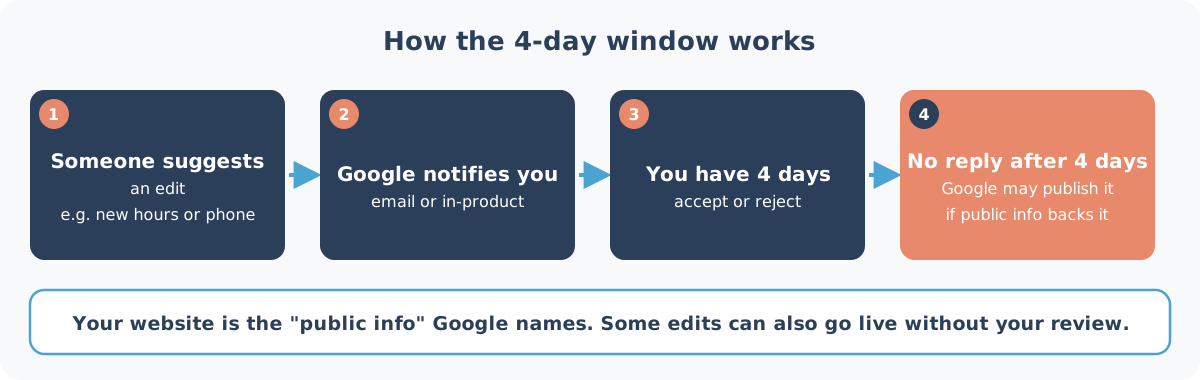
How the 4-day window works, and when Google skips it
Anyone who spots something they think is wrong on a profile they don't manage can suggest an edit (Edit your Business Profile). Most are honest. Some aren't.
Three points from Google's page matter:
- Only "certain" edits come to you first. Google says it will notify you about certain suggested edits before they're published. It doesn't list which ones.
- Some edits skip you entirely. Google "may apply suggested user edits to your business information without prior review" where the edit is needed to meet its policies.
- Google's own changes show in blue. In the profile editor, blue text marks information Google has changed, and a notification appears at the top of the page when your profile has Google updates.
To check: open your profile, select Edit profile, and look for the notification at the top and for anything in blue. Accept what's right. Reject what isn't, and fix the field yourself if needed. Google says you can always update your profile directly.
Turn on notifications today
The 4 days only help if the notification reaches someone who reads it. Google's Manage your notifications page gives two routes:
- On Google Search: go to your Business Profile, select More, then Notifications, and turn each type on or off.
- In the Google Maps app: tap Business at the bottom right, then Notifications at the top right.
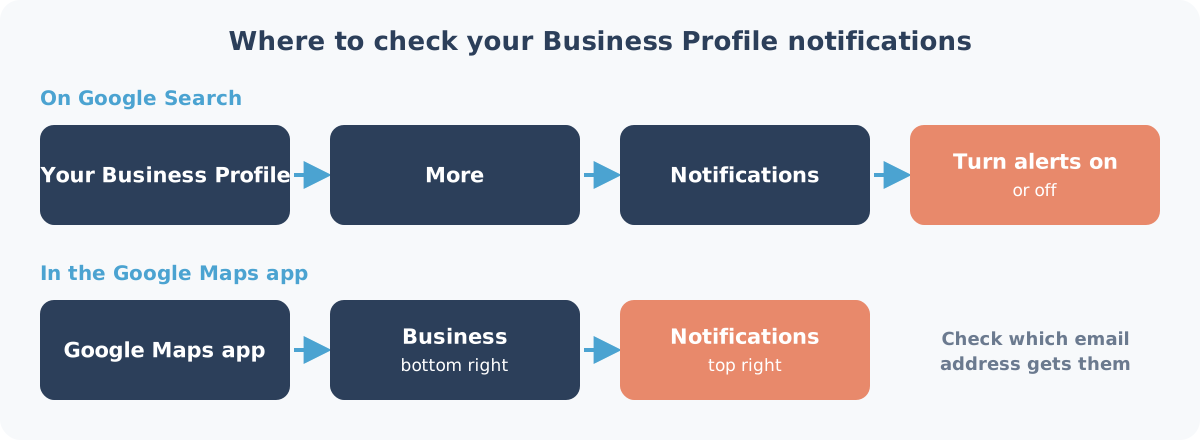
Google doesn't say which notification type carries suggested edits. "Account updates" (changes to your Google Account or Business Profile) and "Business info alerts" are the closest matches, so leave both on.
Then check where the emails go. If your profile still sits under a former manager's Gmail, the notice lands in an inbox nobody reads. Google's advice on protecting your profile is to keep access to the people who need it and remove ex-employees.
Make your website the tiebreaker
Google names "your business website" as the public information it may use to back an unanswered edit. Its page on how it sources business information lists crawled web content, "information from a business' official website", alongside user contributions.
So if your website still shows last year's hours or an old landline, a stranger suggesting that same old detail could look "supported". Make sure your site shows:
- the same phone number as your profile, as text, not inside an image
- the same address, written the same way
- the same hours, including public holidays (our guide to Google holiday hours has every SA date to the end of 2027)
Related risks: fake numbers in photos and moved pins
Suggested edits aren't the only way strangers change what customers see.
- Phone numbers in customer photos. On 10 September 2026, Search Engine Roundtable reported a US case: an AI-generated photo on a roofing company's profile showed someone else's phone number. Google removed the contributor a day later. Check your customer photos now and then.
- Moved map pins. BrightLocal documented a trick that used "Suggest an edit" to drag a business's pin to a different area, hours away. Its page, last updated October 2025, says the loophole has since been fixed. Still, check now and then that your pin is where your door is.
Google also says it will never ask for a one-time password (OTP) or PIN, or try to get you to pay to keep your profile. Anyone phoning to "fix" your listing for a fee isn't Google.
Want us to watch it for you?
Every Heights Care plan includes profile monitoring, so you're not the only one watching your listing for changes like these. See what Care covers and the public prices: from R1,490 a month, month-to-month.
Not sure what's been changed already? A Snapshot Audit (R1,990) names five written gaps on your live profile within five business days, or you don't pay.
Next step: WhatsApp us on 075 330 9812 with a link to your Google listing.
Sources checked on 4 October 2026: Google Business Profile Help (Google updates and suggested edits, notifications) and Search Engine Roundtable. Spotted a mistake? WhatsApp us and we'll fix it and note the change here.