
Google reviews
How do I get Google reviews for my business? A South African guide to asking, replying and the rules
Google reviews for my business, explained for SA owners: how to ask every customer, reply well, stay inside Google's rules and POPIA, and report fakes.
Published
If you've searched for google reviews for my business, here's the short answer. Ask every customer the same way, with Google's own review link, after the job is done. Never offer anything in return. Reply to your reviews, good or bad. Report only the reviews that break Google's rules.
That sounds simple, and it is. It's also easy to let slip. When we checked 20 dental listings in one Cape Town suburb in early October 2026, 16 of the 17 with reviews showed no owner reply on any of their newest three (our Sea Point snapshot).
This guide covers what customers look at, the rules in one table, how to ask, where to put your review link, WhatsApp and POPIA, how to reply, and what to do about fake reviews.
What customers look at in reviews
The best recent numbers come from the US, not South Africa. We haven't found an SA survey that asks the same questions, so read these as a guide, not a local fact. BrightLocal's Local Consumer Review Survey 2026 asked 1,002 US adults. In that survey, 47% won't use a business with fewer than 20 reviews, and 74% only care about reviews written in the last three months. 89% expect business owners to respond to reviews, and 81% expect a response within a week. Half (50%) say templated or generic replies make them unlikely to choose a business.
Two things stand out. Recent reviews matter more than a big total from years ago. And customers read your replies, not just the stars.
The rules in one table
Google's Maps user-contributed content policy is the rulebook for reviews. These are the parts that trip up small businesses, with South African rules added where they apply.
| Do or don't | What it means in practice | Where the rule comes from |
|---|---|---|
| Do ask every genuine customer | Google allows you to "Solicit or encourage the posting of content that does represent a genuine experience" | Google Maps content policy |
| Don't offer anything for a review | No discount, freebie or payment, even for an honest review | Google Maps content policy |
| Don't ask only happy customers | Google doesn't allow merchants to "selectively solicit positive reviews from customers". This is often called review gating | Google Maps content policy |
| Don't push people on the spot | Merchants "should not require or pressure users to leave ratings or write reviews while on the premises" | Google Maps content policy |
| Don't set staff review targets | No asking staff to collect "a certain number of reviews", or reviews that name a staff member | Google Maps content policy |
| Don't review yourself or a rival | Staff, family and competitors have a conflict of interest | Google Maps content policy |
| Take care on WhatsApp, SMS and email | Electronic direct marketing is limited by POPIA section 69, with an opt-out in every message to customers | POPIA |
| Clinics: protect confidentiality | Don't reveal patient information when you reply | HPCSA Booklets 5 and 16 (summarised by EthiQal) |
Ask every customer the same way
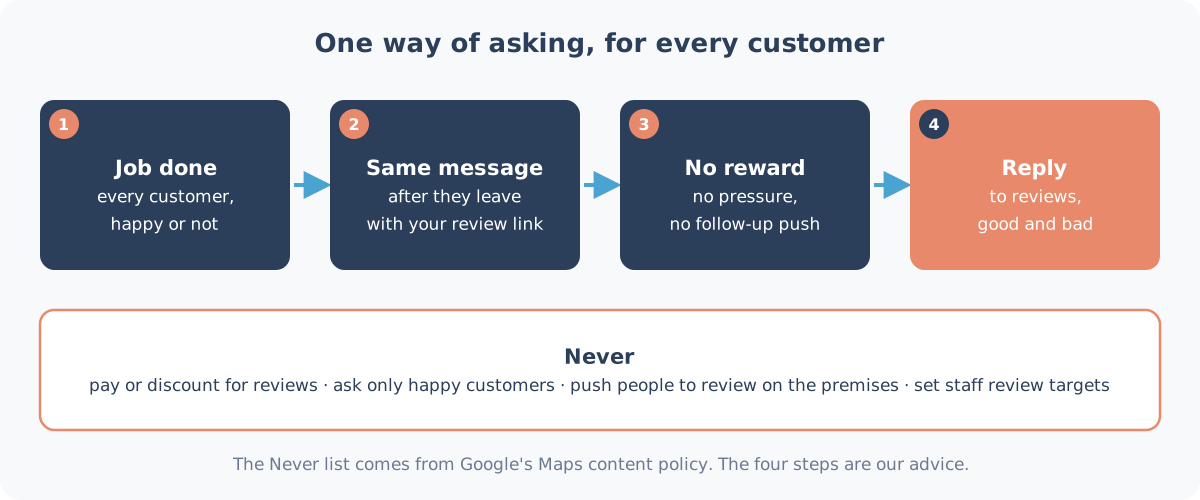
The safest habit is boring on purpose. Everyone gets the same short message, at the same point, whether you think they're happy or not. Something like:
Thanks for coming in today. If you have a minute, we'd appreciate a Google review: [your link]. Thank you, from the team at [business name].
That's all. No "if you loved it". No "five stars please". No discount code. Google's policy also bans asking for "specific content", so don't ask people to mention a product, a staff member or a keyword.
Why the same way for everyone? Because asking only the customers who seem happy is the review gating that Google's policy rules out. A steady trickle of honest reviews, including the odd 3-star one, also looks like what it is: real customers. Google's own tips to get more reviews say that "A mix of positive and negative feedback often feels more trustworthy."
How many reviews do you need?
There's no magic number, and anyone who promises one is guessing. Two things are worth knowing.
Google says reviews are part of how it judges "prominence". Its page on improving your local ranking says this factor is "based on info like how many websites link to your business and how many reviews you have", and that "More reviews and positive ratings can help your business's local ranking." That's a general statement from Google, not a promise for any one business. Distance and relevance count too, and you can't buy your way up: Google says "There's no way to request or pay for a better local ranking on Google."
Customers care about recency. In the BrightLocal survey above, 74% only cared about reviews from the last three months. A profile with 40 reviews, the newest from 2019, can look less alive than one with 15 from this year. So the goal isn't a big push once. It's a few honest reviews every month, from asking every customer, every time.
Where to ask: a channel guide
This is our own guide. It's based on Google's suggested places for the link and on the Sterling Sky pattern described in the next section.
| Channel | When to send | How | Watch out for |
|---|---|---|---|
| Same day, after the job or visit | One short message with the link | POPIA: customers only, say who you are, include an opt-out | |
| With the invoice or a thank-you note | Link at the end, one line | Don't bury it under marketing | |
| Receipt or invoice | At payment | Short link or QR code printed at the bottom | Fine, as long as nobody is pushed to do it there and then |
| Counter or table QR | Passive only | A small sign with the QR code | Don't ask people to review on the spot, and don't run staff drives |
| End of a chat | When a customer's question is sorted | Link with a thank-you | Don't ask in the middle of a complaint |
Pick one or two channels and use them for everyone. Consistency matters more than the channel.
Your review link and QR code
Google gives you a review link and a QR code from your Business Profile. Its page on creating a review link or QR code gives the steps:
- Go to your Business Profile.
- Select Read reviews, then Get more reviews.
- Select Copy for the link, or right-click the QR code and save the image.
Google notes that review QR codes "can only be generated on a computer browser, not on mobile devices", so do this on a laptop.
Google suggests putting the link on receipts, in thank-you emails and at the end of a chat, and it also suggests you "Print and display the QR code in your store". That last one needs care. Sterling Sky, a local search agency, looked at five businesses whose review posting was switched off for about 30 days in 2026 (Sterling Sky, 28 September 2026). The patterns it saw included reviews left inside the business, QR codes at the counter or tables, and bursts of 10 or more reviews in a day. The author bases this on five businesses. It's a practitioner's reading of the patterns, not a rule Google has published.
Our view, until there's better evidence: send the link after the visit, by receipt, email or WhatsApp. If you keep a QR code at the counter, let it sit there quietly. Don't hand customers a phone and ask them to review on the spot, because Google's policy already rules out pressure on the premises.
Asking on WhatsApp: POPIA
If you message customers on WhatsApp, SMS or email, know the law on unsolicited electronic messages first. Section 69 of POPIA prohibits direct marketing by electronic communication unless the person has given consent or is a customer. For customers, it applies only where you got their details "in the context of the sale of a product or service", and only if they get a chance to object "on the occasion of each communication". Every message must also say who it's from and give a way to ask for messages to stop.
Does a review request count as direct marketing? We can't answer that for you, and this isn't legal advice. So treat it as if the rules apply:
- Message only people who actually bought from you, on the number they gave you.
- Say who you are in the message.
- Ask once. Don't chase.
- Add a line such as Reply STOP and we won't message you again, and honour it.
If customers often reach you on WhatsApp first, our no-cost WhatsApp link and QR code tool makes the chat link for your number.
Replying: speed and tone
Replying costs nothing, it's public, and it was the biggest gap in our Sea Point check. Google's page on managing reviews explains the steps: go to your Business Profile, select Read reviews, then Reply next to the review. Your reply is checked against Google's policies first. Google says that usually takes up to 10 minutes, "but sometimes a review can take up to 30 days". The reviewer is notified, and "Customers can still change their review after reading your reply."
Google's review reply tips come down to a few habits:
- "Keep it short and simple".
- Don't send the same "thank you" to everyone. Mention something from the review.
- "Respond in a timely manner".
- For a complaint, never share the reviewer's private information, and "politely request that the reviewer contact you via phone or email to resolve the issue privately."
In our view, a good reply to a complaint is three or four sentences long. Thank them, say sorry for the experience without arguing about the facts in public, give a name and a number, and stop there.
Clinics and other health practices. A summary of HPCSA Booklets 5 and 16 in medico-legal insurer EthiQal's August 2026 webinar notes tells practitioners not to reveal confidential information when they respond to online reviews. In our reading, that means not confirming that the reviewer is a patient and not mentioning treatment. If you're unsure, ask your professional body or your indemnity insurer before you reply.
Fake and unfair reviews: what you can report
Every business gets a review it thinks is unfair. Google separates "unfair" from "against the rules". Its page on reporting inappropriate reviews says you can report any review, "but only those that violate Google policies are eligible for removal". It also says: "Do not report a review just because you disagree with it or dislike it."
Reviews worth reporting are the ones the content policy covers. That includes reviews from someone who was never a customer, spam, conflicts of interest (a competitor, an ex-employee) and offensive content. To report one:
- Go to your Business Profile and select Read reviews.
- Next to the review, select Report, choose the reason and send it.
- Check the status later in Google's Reviews Management Tool. Google says evaluation "typically takes several days".
If Google decides there's no violation, the same page explains you can submit a one-time appeal. For a review that's unfair but allowed, reply calmly instead. Future customers read the reply, too.
A simple weekly routine
This routine is our suggestion, not a Google rule. It keeps reviews moving without bursts.
- Monday: open your profile, look at the newest reviews and reply to anything from the past week.
- Every day you trade: send the same review message to every customer you served, once.
- Once a week: check for reviews that look fake or break the rules, and report them through your Business Profile.
- Once a month: compare this month's reviews with last month's. A sudden jump is worth a look, because bursts were one of the patterns Sterling Sky saw before posting blocks.
Put the routine in someone's diary. In our Sea Point check, replies were where it broke down.
What we never do
We don't buy reviews. We don't filter who gets asked, and we don't offer customers anything for a review. We also don't promise a number of reviews or a star rating, because nobody honest can. What we can do is make sure every customer gets asked the same way, and that each reply we write is written for that review, in your voice, never a copy-paste template.
Want help with your reviews?
Heights Care includes review replies on every plan. Care Essential is R1,490 a month and covers review replies (fair use). On Care Standard (R2,200 a month), new Google reviews get a reply within 4 business hours (Mon to Fri 08:00 to 18:00 SAST), or that month's Care fee is credited. All plans are month-to-month. See what each plan includes. There's more on our Google reviews help for Durban businesses, and on profile management in Cape Town, where review replies are part of the work.
Not sure where your profile stands? Our Google Business Profile audit starts with a Snapshot Audit (R1,990), which gives you the top 5 gaps on your live profile in writing, within five business days, or you don't pay.
Next step: WhatsApp us on 075 330 9812 with a link to your Google listing.