
Hours and holidays
Is 4 November a public holiday in South Africa? Election Day trading hours, staff pay and your Google profile
Is 4 November a public holiday in South Africa? Yes. What Election Day means for your trading hours, staff pay and Google Business Profile.
Published
Is 4 November a public holiday in South Africa? Yes. Wednesday 4 November 2026 is a public holiday across the country, so that people can vote in the local government elections. If you run a shop, salon, café or practice, that leaves three things to sort out before next Wednesday: your hours, your staff, and what Google tells your customers.
The short version: decide whether you're open, agree any work with your staff, then add 4 November to your Google Business Profile yourself. Google won't suggest it.
Why 4 November is a public holiday
The President declared the day under section 2A of the Public Holidays Act, in Proclamation Notice 346 of 2026 (Government Gazette No. 55352, 8 September 2026). The Presidency's statement says Wednesday 4 November 2026 was declared "as a public holiday throughout the country". The proclamation names that one date only, so it's a once-off, not a new yearly holiday.
On the day, the Electoral Commission lists voting stations as open from 07:00 to 21:00. The Presidency also reminded voters that they "will only be able to cast their votes at the polling stations in wards where they are registered". So anyone working that day may need time to get back to their own ward.
Two lists that don't show it yet
When we checked on 8 October 2026, 4 November wasn't on gov.za's own public holidays page. It wasn't on Google's holiday list for South Africa either, which jumps from Heritage Day straight to the Day of Reconciliation.
The Google list matters most. On the holidays it lists, Google may warn people that your hours "might differ", and it suggests those dates when you set special hours. Because 4 November isn't on it, you have to add the date yourself.
Do you have to close?
The proclamation makes 4 November a public holiday. It doesn't set trading hours, and it doesn't say businesses must close. Whether you open is your decision, along with anything your lease, licence or industry agreement says.
Whatever you decide, say it everywhere customers look. Here's what to set for each choice:
| Your plan for 4 November | On Google (special hours) | Staff | Tell customers |
|---|---|---|---|
| Closed all day | Add 4 November and tick Closed | Paid for the day if Wednesday is a normal working day for them (see below) | WhatsApp status, website banner and door sign |
| Open, shorter hours | Add 4 November, untick Closed and enter the hours | Only people who agree to work, paid at public holiday rates | The same, with your hours |
| Open as normal | Add 4 November anyway, with your normal hours | The same as above | A short we're open on Election Day status or Google post |
Why set normal hours as a special date? Google's special hours guide says: "It's a good idea to confirm your hours for official holidays, even if they're the same as your regular hours."
If you open, plan shifts so that everyone working can still get to their own voting station before 21:00. The President also urged employers "to make provision for employees to exercise their Constitutional right to vote on 4 November."
Paying staff on 4 November: the basic rules
This is general information, not legal advice. The rules come from section 18 of the Basic Conditions of Employment Act, which covers every public holiday, including declared ones like this.
First, you can't require anyone to work on a public holiday unless it's in line with an agreement with them. Then the pay depends on whether Wednesday is a normal working day for that person:
| If the employee... | You must pay at least... |
|---|---|
| normally works on a Wednesday and doesn't work on 4 November | the wage they'd normally get for that day |
| normally works on a Wednesday and does work on 4 November | double that wage, or that wage plus what they earn for the time worked, whichever is more |
| doesn't normally work on a Wednesday but works on 4 November | their ordinary daily wage, plus what they earn for the work that day |
Pay for the public holiday goes out on the employee's usual payday.
Employment contracts, bargaining council agreements and sectoral determinations can add their own rules. If you're unsure how they apply to your team, check with the Department of Employment and Labour or a labour adviser before 4 November, not after payday.
How to add 4 November on your Google Business Profile
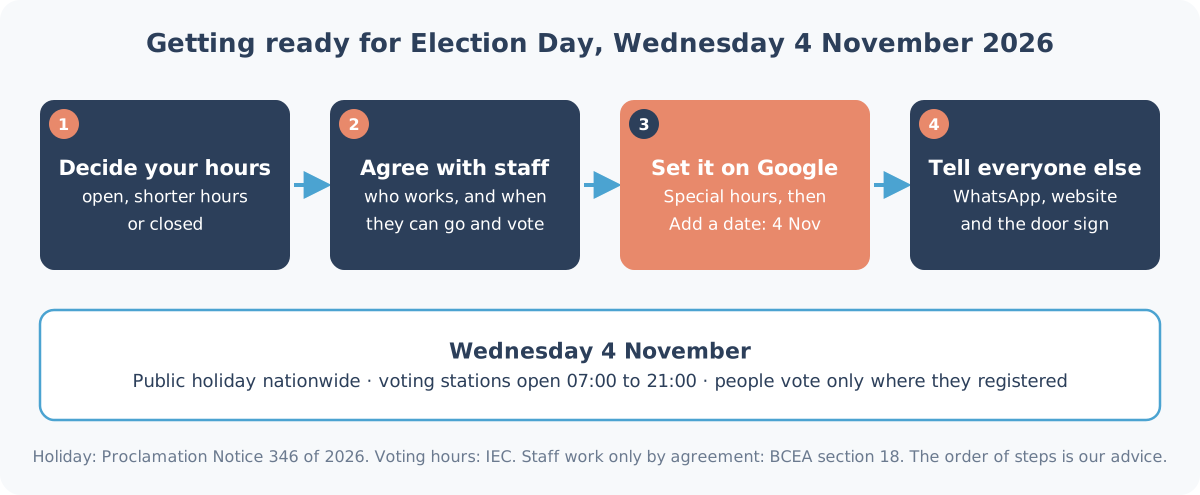
These are the steps from Google's special hours guide:
- Go to your Business Profile.
- Select Edit profile, then Hours.
- In the "Business hours" section, next to Special hours, select Edit.
- Select Add a date, then enter 4 November 2026.
- If you're closed, make sure Closed is ticked. If you're open, untick it and enter your hours.
- Select Save.
One catch: Google says special hours only show on your profile if your business hours are set to "Open with main hours". If you've never set regular hours, do that first.
While you're in your profile, look for any suggested edits to your hours from other people. Google gives owners a short window to respond (how suggested edits work).
Do the rest in one go
Our no-cost holiday hours planner already includes 4 November. Enter your normal hours once and it gives you a WhatsApp away message, website banner text, a printable door sign and calendar reminders, with every other South African public holiday to the end of 2027.
The next date after this is the Day of Reconciliation on Wednesday 16 December, followed by Christmas and the Day of Goodwill. The full list, with the steps for each, is in our guide to Google Business holiday hours.
Want someone else to keep an eye on it?
Every Heights Care plan includes keeping your Google holiday and special hours up to date. Care Essential is from R1,490 a month, month-to-month. See what each plan includes, or how we look after profiles in Cape Town and Durban.
Want us to check your hours for 4 November? WhatsApp Shaun on 075 330 9812 with a link to your Google listing.