
Hours and holidays
Google Business holiday hours: South African public holidays for 2026 and 2027
Every South African public holiday to the end of 2027, and how to set Google Business holiday hours so customers don't find a locked door.
Published
If your Google Business Profile doesn't show special hours for a public holiday, Google may tell customers your hours "might differ", or simply show your normal hours while your door is locked. Setting Google Business holiday hours takes a few minutes per date: open your profile, go to Edit profile > Hours > Special hours, and mark each holiday as closed or enter the hours you'll actually trade.
Below is every South African public holiday from now to the end of 2027, including the Sunday-rule Mondays and the once-off Election Day on 4 November 2026. After the table you'll find the exact steps from Google's help page, what tends to go wrong, and a free planner that does most of the work for you. Some people still call it Google My Business. Same thing, same steps.
Every SA public holiday to the end of 2027
South Africa's public holidays come from the Public Holidays Act 36 of 1994. Two rules matter for your hours:
- The Sunday rule. Section 2(1) of the Act says that whenever a public holiday falls on a Sunday, the following Monday is a public holiday. A holiday on a Saturday does not move.
- Declared days. Section 2A lets the President declare an extra public holiday by proclamation in the Government Gazette. That's how 4 November 2026 became a holiday.
We checked every date below against the government's public holidays page and the Act on 4 October 2026.
2026 (still to come from today)
| Date | Day | Holiday | Notes |
|---|---|---|---|
| 4 Nov 2026 | Wednesday | Local Government Elections Day | Once-off. Declared by the President (Proclamation Notice 346 of 2026, Gazette No. 55352) |
| 16 Dec 2026 | Wednesday | Day of Reconciliation | |
| 25 Dec 2026 | Friday | Christmas Day | |
| 26 Dec 2026 | Saturday | Day of Goodwill | Saturday, so no Monday off |
Earlier in 2026, for the record: New Year's Day (Thu 1 Jan), Human Rights Day (Sat 21 Mar), Good Friday (3 Apr), Family Day (Mon 6 Apr), Freedom Day (Mon 27 Apr), Workers' Day (Fri 1 May), Youth Day (Tue 16 Jun), National Women's Day (Sun 9 Aug, observed Mon 10 Aug) and Heritage Day (Thu 24 Sep).
2027
| Date | Day | Holiday | Notes |
|---|---|---|---|
| 1 Jan 2027 | Friday | New Year's Day | |
| 21 Mar 2027 | Sunday | Human Rights Day | Falls on a Sunday |
| 22 Mar 2027 | Monday | Human Rights Day (observed) | Sunday rule |
| 26 Mar 2027 | Friday | Good Friday | Easter Sunday is 28 March 2027 |
| 29 Mar 2027 | Monday | Family Day | Monday after Easter |
| 27 Apr 2027 | Tuesday | Freedom Day | |
| 1 May 2027 | Saturday | Workers' Day | Saturday, so no Monday off |
| 16 Jun 2027 | Wednesday | Youth Day | |
| 9 Aug 2027 | Monday | National Women's Day | |
| 24 Sep 2027 | Friday | Heritage Day | |
| 16 Dec 2027 | Thursday | Day of Reconciliation | |
| 25 Dec 2027 | Saturday | Christmas Day | |
| 26 Dec 2027 | Sunday | Day of Goodwill | Falls on a Sunday |
| 27 Dec 2027 | Monday | Day of Goodwill (observed) | Sunday rule. Not yet shown on gov.za's list (see below) |
About 27 December 2027. When we checked, gov.za's 2027 list didn't include Monday 27 December. The Act is clear, though: Day of Goodwill falls on a Sunday in 2027, so the Monday after it is a public holiday. Plan for it now.
Dates can change. The President can declare extra holidays at any time, as happened with Election Day. We'll add any new declarations to this page and to the planner when they're gazetted.
Three things the table doesn't tell you
- Christmas Eve and New Year's Eve aren't public holidays. Plenty of cafés, salons and practices still close early on 24 and 31 December. If you do, add those dates as special hours too.
- Google's own holiday list for South Africa doesn't match the government's exactly. On Google's "About holidays on Google" page, checked on 4 October 2026, the South African list ran to 1 January 2027 and didn't include 4 November 2026. If Election Day changes your hours, you'll need to add it yourself (step 4 below). Google also calls 26 December "Boxing Day". It's the same day as Day of Goodwill.
- Google only suggests the holidays on its list. Anything else, including your own annual shutdown, is a custom date you add by hand.
Why wrong holiday hours cost you customers
Picture a family driving from Durban North to your Umhlanga café on Day of Reconciliation because Google said you're open. The shutters are down. They don't know you put a note on Instagram. They know Google told them one thing and your door told them another, and some of them will say so in a review.
It works the other way as well. If you trade on a public holiday and Google shows nothing, or shows the "might differ" note, people looking for somewhere open may pick the place down the road that has confirmed its hours.
Here's what's documented, and what isn't:
- Google warns customers. Google's help page says that on the holidays it lists, "a warning may appear on your Business Profile that tells users your business hours might differ", and suggests setting special hours in advance for those dates (About holidays on Google).
- Google recommends confirming holidays even when nothing changes. Its special hours page says "It's a good idea to confirm your hours for official holidays, even if they're the same as your regular hours" (How to set Special hours).
- Being open seems to affect where you show in the map results. In December 2023, Sterling Sky reported that since November 2023, listings ranked higher in the local pack while open and could drop sharply while closed (Sterling Sky). BrightLocal then tested 50 US business locations over three days and found higher average local rankings during opening hours. The biggest change was for fast food restaurants, about 2.4 positions on average (BrightLocal, Dec 2023). Both studies are US data from practitioner and vendor sources. BrightLocal also noted that Google may "dial back" this signal, and it advises against listing hours that aren't true.
What that means for you: set the hours you'll really keep. Marking yourself open on a holiday you're closed may help you rank for a day, but the people who drive over will find a closed door. We don't know of any public study measuring how many reviews or visits a South African business loses from wrong holiday hours, so we won't make up a number.
How to set special hours on your Google Business Profile
These steps follow Google's help page How to set Special hours, which we checked on 4 October 2026. Google changes its screens from time to time, so if a button has moved, that page is the one to trust.
Before you start: sign in with the Google account that manages your profile. Your regular hours must be set to "Open with main hours". Google says special hours won't show on your profile otherwise.
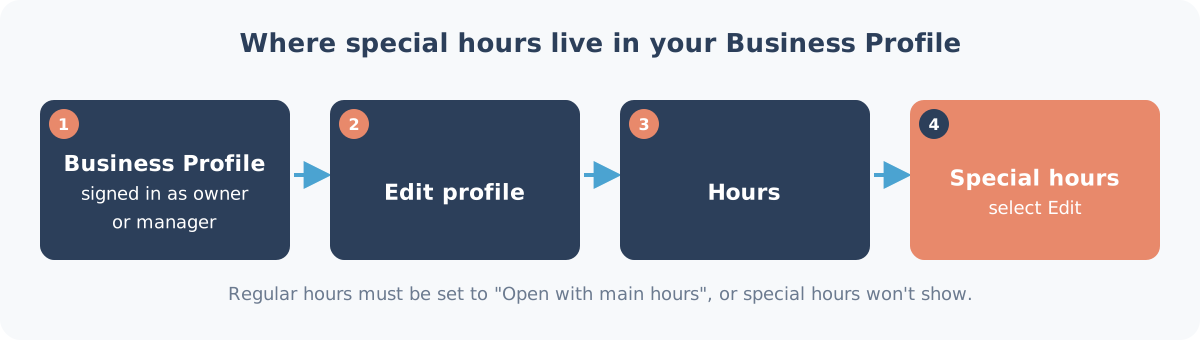
- Open your Business Profile. Go to business.google.com, or search your business name on Google while signed in. Google says you can manage your profile on Search and Maps.
- Select Edit profile, then Hours.
- In the "Business hours" section, next to "Special hours", select Edit.
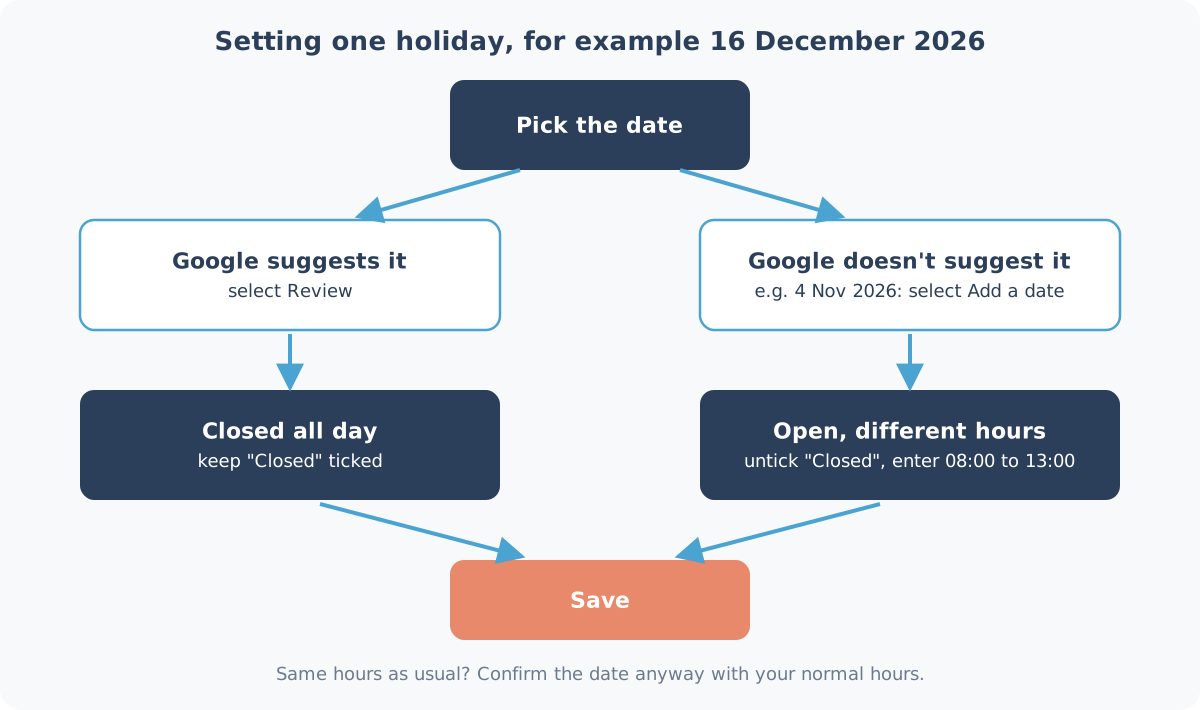
- Pick the date.
- Google suggests upcoming holidays from its list. To confirm a suggested date, select Review.
- For a date Google doesn't suggest (4 November 2026, 24 December, 27 December 2027, your own shutdown), select Add a date and enter it.
- To change a date you've already set, select it.
- Set the hours for that day.
- Closed all day: make sure the "Closed" box is ticked.
- Open, but with different hours: untick "Closed", then enter your opening and closing times, for example 08:00 to 13:00.
- Open in two blocks (say, breakfast and dinner only): select More > Add hours and enter the second set.
- Select Save.
To remove a special day later: if it's set to closed, select Delete next to the date. If it has hours, select More > Remove day next to the hours. Then save.
After you save, the special hours sit in the "Hours" part of your business information, and under "Special hours" in Edit profile. They only show to customers on the dates you set, so you can load all of December in October and forget about it.
Open on the holiday as usual? Confirm it anyway. Pick the date and enter your normal hours. That's the step Google recommends, and it tells customers you've actually thought about it.
More than one branch
If you look after several locations, Google's page also covers bulk updates through the spreadsheet in Business Profile Manager. Use the "Special hours" column, with "x" for a full-day closure, for example 2026-12-25: x or 2026-12-24: 08:00-13:00. Be careful: Google warns that empty columns with headings in your spreadsheet can wipe existing information. If you have only a few branches, editing each profile is usually safer.
Closing for a week or longer
Google's special hours are meant for short changes. The special hours page says they cover closures "for up to 6 days in a row", and that for 7 or more days you should mark the business as temporarily closed. Google's "Mark your business as closed" page puts the line at "more than 7 days". The two pages differ by a day. Here's a simple rule:
- 6 days or fewer: special hours.
- More than a week (for example closed from 19 December to 4 January): temporarily closed, then mark the business as reopened when you're back.
- Exactly 7 days: Google's two pages disagree, so pick one, and check how your profile looks on Google before you leave.
Temporarily closed is a big label on your profile, so diarise reopening. If you forget, Google keeps showing you as closed after you're back at work.
Different hours for one service
If only part of the business changes (takeaway stops but the restaurant stays open, or a clinic's walk-in hours change), Google has More hours for service-specific times. Your main special hours should still match when the doors are open.
Sunday-rule Mondays: the dates that catch people out
The Monday holidays are the ones owners forget, because the "real" holiday is on the weekend and most calendars only show that.
Over the period in this post there are three:
- Monday 10 August 2026 for National Women's Day (already past).
- Monday 22 March 2027 for Human Rights Day. 21 March 2027 is a Sunday.
- Monday 27 December 2027 for Day of Goodwill. 26 December 2027 is a Sunday, and Christmas is on the Saturday before it, so that's a three-day weekend that ends on a public holiday Monday.
And two that look like they should roll over but don't, because they fall on a Saturday:
- Saturday 26 December 2026 (Day of Goodwill). No Monday off.
- Saturday 1 May 2027 (Workers' Day). No Monday off.
On these Mondays, staff are off and customer habits change. Check whether Google suggests the date. If it doesn't, add it yourself.
A note for employers: the Act lets an employer and employee agree to swap a public holiday for another day. That's an HR matter and doesn't change what Google shows. Set Google to whatever your front door will actually do.
Update WhatsApp, your website and the door sign too
Google is usually the first place people check, but it isn't the only one. A customer who sees "Closed" on Google and then gets an instant WhatsApp reply saying "We're open, come through!" will trust neither.
Do these on the same day you set your Google special hours:
- WhatsApp Business: set an away message for the holiday dates, and post a status a few days before.
- Your website: a one-line banner at the top, or an update to your hours page.
- Booking systems: block out the dates so nobody books a 10:00 cut on Christmas Day.
- The front door: a printed sign with the dates, put up the week before.
- Facebook and Instagram: if you post there, a short post with the same hours.
The test is simple. Whichever channel a customer uses, the answer should be the same.
Plan them all at once with the free planner
Doing this one holiday at a time is how dates get missed. Our free holiday hours planner lists every South African public holiday from today to 31 December 2027 with the Sunday rule already applied, including Election Day on 4 November 2026 and Monday 27 December 2027.
Enter your normal hours once, tick the holidays you're closing or changing, and it gives you:
- a checklist of dates to add to your Google special hours, to tick off as you go
- a WhatsApp Business away message and status text
- a line of text for your website banner
- a printable A4 door sign
- calendar reminders (a .ics file) two weeks before each date
It runs in your browser. There's no sign-in, and nothing you type is sent to us.
We'd suggest a 15-minute sitting this month: run the planner, add 4 November and the December dates to Google, and set the calendar reminders for 2027. That covers the festive season before it gets busy.
Want someone else to keep an eye on it?
If you'd rather not think about public holidays at all, every Heights Care plan includes keeping your Google holiday hours up to date. We add your special hours ahead of each public holiday, including once-off days like Election Day, so you don't have to remember them. Every plan also includes profile monitoring, replies to new Google reviews and Google posts. See what's in each Care plan or our public prices: Care runs from R1,490 a month, month-to-month.
Next step: plan your holiday hours with the free planner, or WhatsApp us on 075 330 9812 and we'll tell you if Care is the right fit.
Sources checked on 4 October 2026: gov.za public holidays, Public Holidays Act 36 of 1994, Proclamation Notice 346 of 2026, and Google Business Profile Help. Spotted a mistake? WhatsApp us and we'll fix it and note the change here.